01 / PLAN
Schedule the season.
Set weekly or every-other-week routes for the season. Preview visits, manage rain delays, and review stop order before heading out.
Explore lawn routes
 ™
TurfStack™ is lawn care business software for solo operators and small crews. Plan recurring routes, track work time, and review what each job earns after labor, fuel, equipment, and overhead—then invoice the completed work.
Private beta now underway · Solo operators & small crews
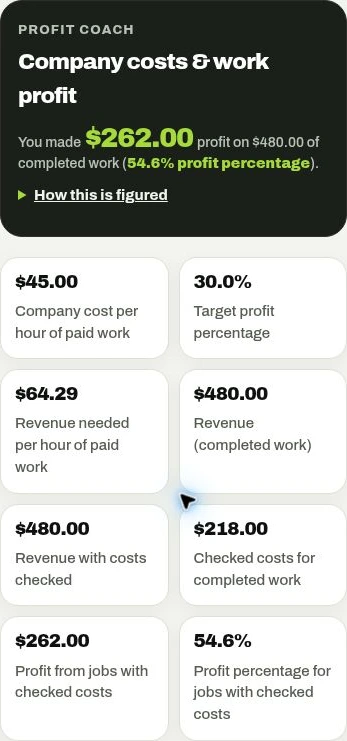
Actual app screen.
Fictional demo numbers.
You already know your business. Get a clearer connection between the route you run, the crew doing the work, and the profit each property produces.
Set weekly or every-other-week routes for the season. Preview visits, manage rain delays, and review stop order before heading out.
Explore lawn routesTrack service time, review travel time, and correct your minutes before confirming the job. Keep each visit connected to its property and history.
Explore crew time clockReview service time, travel, and costs before confirming a job. See earned revenue, confirmed costs, profit, and margin—with missing costs clearly identified.
Explore profit per jobCreate professional invoices with your company logo and contact details. Add your payment link, offer printed invoices, and record full or partial payments as they arrive.
Explore lawn care invoicingsave your fertilizers, pavers, mulch and services with your price and your cost, then add them to estimates and invoices in a tap.
base price plus price per 1,000 sq ft, adjusted for yard difficulty and visit frequency.
invite your crew to clock in and see the route, without seeing your prices, pay rates or profit.
Real screens from TurfStack, shown with fictional demo data. Tap a screen for a closer look.
See revenue, checked costs, profit, and margin together. Missing costs stay visible, so you know when a job still needs review.
Explore job profitability ↗Search your tools, pin your favorites, and jump into customers, routes, projects, and invoices from one place.
Explore the daily workflow ↗Screens captured from the app using sample records. Figures are examples, not promised results. The beta continues to evolve.
Explore how service time, travel, and operating costs affect the return on a job. Adjust the example to see the difference.
See what a few extra minutes can change.
Start with the illustrative $80 hourly cost, or enter your own. This simplified example charges service and travel at the same rate; your company’s actual cost model may differ.
Open this page in a browser to try the calculator. File previews may show the fixed example below.
Example cost = (service + travel minutes) ÷ 60 × hourly cost, plus materials. Profit ÷ price = margin. Illustration only; not a quote or your saved company costs.
A busy mowing schedule does not tell you which properties earn a healthy margin. TurfStack connects the price of completed work with reviewed time and your company costs, so you can compare properties using more than the invoice total.
Bring labor, fuel, equipment, vehicle, overhead and direct costs into the same review.
Lawn care job costingReview profit and margin by property, then identify yards that need a closer look at pricing or service time.
Profit by propertyReview the crew who actually worked, service time and travel time before confirming a job.
Crew time and labor costsCreate branded invoices from completed work and record payments without confusing revenue with profit.
Lawn care invoice softwareProfit estimates depend on your saved costs and reviewed work. Missing costs are flagged. TurfStack is in private beta; early access is by invitation.
A short narrated walkthrough of job profit, property comparisons, daily routes and invoices. Shown with fictional demo data.
Watch the product demoCompare same-price jobs with different service times, then enter your own costs in the job-profit calculator.
Calculate lawn care job profitEnter your company costs and add your customers, properties, and services.
Schedule recurring routes, review stop order, and open directions in your maps app.
Track the work, check service and road time, and confirm the costs before closing the job.
See confirmed job margins, invoice completed work, and record payments as they arrive.
You do. TurfStack stores and processes your information to provide the service. You remain in control of the customer information you enter.
No. We do not sell personal information or share your customer roster with other businesses using TurfStack.
TurfStack is designed to keep each business’s records separate and restrict unauthorized access.
Our service providers include Replit for hosting and databases, Clerk for sign-in, Resend for email, and Twilio for supported texting features. They process information as needed to deliver those services.
We use reasonable safeguards to protect your records and restrict access. No online service can guarantee complete security.
Yes. Download supported records from the app, or email corey@turfstackapp.com to request a full copy, corrections, or deletion. Keep your own copies of important records, especially during the beta.
Read our Privacy Policy and Terms of Service for details.
I’m Corey Creason, owner of C&C Lawn and Landscape LLC in Liberty, Missouri. I built TurfStack because the tools I used to run the business were missing a clear view of profit on each job. TurfStack connects that insight with the work you already manage every day.
Lawn care owners who want to connect scheduled work, service time, and job profitability, including solo operators and small crews.
No. Profit and margin use your entered costs and reviewed work information. They are management estimates, not a guarantee. Jobs with missing costs are flagged so you can see when the profit picture is incomplete.
Yes. Set weekly or every-other-week schedules with a season start and end date. Preview changes before applying them, and move or skip visits without deleting completed work history.
Review a proposed stop order with available road-driving estimates before applying it. Manual ordering is available when an address or routing service cannot be used. Estimates exclude live traffic and service time; the proposed order is not guaranteed optimal.
You can add your own payment link (Square, Stripe or similar) to every new invoice, and customers who prefer paper can get printed invoices. Payments are recorded in TurfStack when you receive them. Built-in online card processing is planned.
Open directions for a stop or the next property in Apple Maps or Google Maps. Your maps app provides turn-by-turn navigation; TurfStack keeps your saved route order.
TurfStack is in early testing. You can request early access now. Access is by invitation while we work with testers; public signup and paid subscriptions are not open yet.